Introduction
Most EVA tote lines hit a wall. It is not ink speed. It is handling time.
In this guide, we use an EVA bag printer rotation workflow. You will learn faster loading, stable alignment, and quick QC checks, so you can boost output without raising rejects.
How a Rotating EVA Bag Printer Boosts Output
Reduce touches per bag
Every touch is a tax on throughput. When we print EVA totes on a flatbed, we often do this cycle: load, align, print, remove, rotate by hand, align again, then repeat. It works, but it burns time and focus. A rotating setup keeps the bag mounted while the system changes the print angle. It reduces the number of times we grab the bag body. That matters because EVA can flex, collapse, and shift during handling.
Fewer touches also reduce defect risk. Many smears, scuffs, and edge lifts happen during reloading, not during printing. When the bag stays in one fixture cycle, it is less likely to rub against tables or clamps. It also reduces operator fatigue, which protects alignment across long shifts. Output rises because time drops, but quality also rises because variability drops.
Turn multi-side work into one fixture cycle
Multi-side printing feels slow because we treat each side like a separate job. Rotation changes that mindset. We can map the tote into faces, then print them in sequence without removing the bag. It supports two common patterns. One is true rotation for wrap-like zones. The other is indexed rotation, where we rotate to fixed stops for each panel. Both patterns reduce “remove and reload” time.
This also improves repeat jobs. When a buyer wants the same logo on both sides, we can build a preset rotation path. The operator follows it each run. That makes the result more consistent across batches. The fixture becomes the process, not the operator’s eye. For B2B orders, that consistency is often more valuable than peak speed.
Keep alignment stable on curved or soft surfaces
EVA totes can look flat, but they still move. Seams, ribs, and soft walls shift under pressure. Manual alignment can drift side to side. Rotation helps because we keep the same zero-point. We align once, then rotate around a controlled axis. Even if the surface is slightly curved, stable motion improves edge matching.
Still, rotation is not magic. We must support the bag shape. Use an internal insert so the wall does not collapse. Use hard stops so the start point stays consistent. If you use registration marks, keep them in hidden zones. Then each new face references the same origin. This is how a rotating EVA bag printer workflow avoids the slow “hunt and place” cycle each time.
Build a continuous workflow
Rotation supports flow production. While one bag prints, the next bag can be staged. When a print finishes, the operator unloads and loads quickly, then starts the next run. It reduces idle gaps between prints. This is where rotation can boost output more than “faster passes” ever will.
To get that gain, we need a simple station layout. Stage clean bags on one side. Stage finished bags on the other. Keep cleaning tools and inserts within reach. Keep files and presets ready before the shift begins. When the workflow is smooth, the printer stays printing. That is the goal. We do not chase speed settings first. We chase less downtime.
Tip:Track “touches per bag” for one hour. Then reduce that number before changing print settings.
Where rotation helps most on EVA totes
Rotation helps most when the design needs multiple faces, or when alignment matters across sides. It also helps when you run repeat SKUs, like a branded tote for a retail chain. It can help for wrap-like looks around side edges. It can help when you print near corners and seams, where manual reloading often misaligns.
It helps less when the tote is extremely soft and collapses easily. In that case, you may need stronger inserts or a different indexing method. It also helps less when you only print one small logo on one face. For those jobs, a flatbed still wins on simplicity. The best use case is a tote line where side count and repeat orders are common.
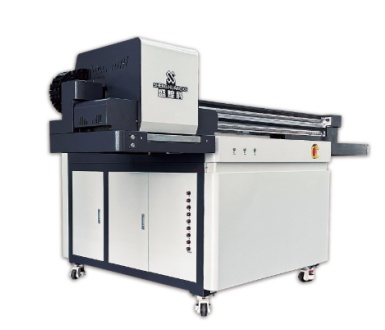
Choose the Right Rotating UV Setup for EVA Tote Bags
Rotary attachment versus dedicated rotating platform
You usually have two paths. A rotary attachment upgrades an existing setup. It can be cost effective and flexible. A dedicated rotating platform is designed around stable motion and often offers better repeatability. The right choice depends on your order mix and your tote shapes.
If you print many different products, an attachment may be enough. If you print totes all day, a dedicated rotation path can pay back faster. Think about footprint, fixture swap time, and operator learning curve. Also think about maintenance. Rotation adds moving parts, so you want easy access and simple calibration steps.
What to look for in an EVA bag printer for rotation
Rotation demands stability and control. Motion must be smooth. Stops must be repeatable. You also need good ink management, since many tote jobs use white and varnish. White ink needs stable circulation and consistent jetting behavior. If it drifts, your color will drift. For tote work, you also want height clearance, because the bag wall can vary in height.
Look for workflow features, not only headline specs. Can you store presets per SKU. Can you set a repeatable zero-point quickly. Can the fixture lock without crushing EVA. Can operators load and unload safely. If these answers are yes, the EVA bag printer will feel “production ready,” not “demo ready.”
Bag geometry check
Not every tote rotates well. Before you commit, check four things. One is seam structure. Seams can create bumps that affect head clearance. Two is rib texture. Deep ribs can distort fine detail. Three is collapse risk. Soft EVA walls may fold under clamp pressure. Four is handle hardware. Handles can block motion or hit the head path.
If the bag fails any of these checks, do not abandon rotation. Instead, adjust the method. Use indexed stops instead of continuous rotation. Add an insert. Change clamp points. Move the print zone away from the risky area. Rotation is a tool. The fixture design makes it succeed.
Rotation fit table
Tote factor | What can go wrong | Best fix | Why it helps |
Soft wall collapse | Drift and blur | Add internal insert | Keeps panel shape stable |
Tall seams or ribs | Head clearance risk | Shift print zone or index | Protects head distance |
Uneven bottom shape | Tilt and banding | Level support base | Keeps motion consistent |
Handles near print area | Scuffs and strikes | Mask zones, change clamps | Reduces contact defects |
Multi-face branding | Long handling time | Rotate in one cycle | Cuts reloading steps |
A Step-by-Step Production Workflow for Higher Throughput
File prep for rotary jobs
Rotary success starts in the file. Build a panel map for the tote. Split artwork by face if needed. Add safe zones around seams and edges. If you want a wrap-like look, add a small overlap at edges. It hides small drift and keeps continuity. For repeated SKUs, create a template file that matches the fixture zero-point.
Also plan your white and varnish masks early. White underprint stabilizes color on colored EVA. Varnish protects high-rub zones and can add a premium sheen. Still, both add film build, which can reduce flexibility on fold lines. Use masks to keep heavy layers away from bend zones. It is easier to do this in design than to fix failures later.
Loading and fixturing EVA totes fast
Fast loading is not rushed loading. We want repeatable loading. Start by staging inserts. Insert the support into the bag the same way each time. Align the tote to a hard stop. Apply clamp pressure evenly. Too much pressure deforms EVA. Too little pressure allows drift. Mark clamp positions on the jig if needed, so every operator clamps the same points.
Define a clear zero-point. It can be a corner stop, a pin, or a hidden registration mark. The point is simple. We align once, then rotate from that origin. If the zero-point changes, the whole job shifts. When the fixture is stable, rotation feels easy. When it is not, rotation feels like chaos. Fix the jig first, then chase speed.
Print settings that protect speed and clarity
Speed and clarity are linked. If you push too fast, you may lose fine detail. If you add too many passes, your cycle time explodes. The goal is a balanced recipe. For many tote jobs, a moderate pass count and stable curing wins. White layers often need enough coverage, but not a thick build. Varnish should be used where it matters, not everywhere.
Curing should be tuned for real use. Under-cure can smear during packing. Over-cure can crack after flexing. EVA totes bend during shipping and use, so we tune for flexibility. A simple rule helps: if it cracks on a quick bend test, reduce brittleness by lowering film build or adjusting curing intensity. If it scuffs too easily, use varnish or adjust curing balance rather than adding more color ink.
Note:If you speed up the line, tighten your curing checks first, not last.
Quality Controls That Don’t Slow You Down
Fast QC gates at speed
You can protect quality without turning QC into a bottleneck. Use quick gates that take seconds. After the first article, do three checks. One is a dry rub. One is a small tape pull on a test patch area. One is a bend check on a corner-like curve. If it passes, start production. During the run, sample on a simple schedule, like every set number of bags.
Keep the method consistent. Use the same tape type. Use the same pressure. Use the same bend point. If you change the method each time, results are not comparable. Fast QC works because it is repeatable. It also builds buyer confidence, since you can document a simple pass result for approvals.
Avoid top failure modes during high output
High output introduces new failure modes. Smears often come from under-cure combined with faster handling. Scuffs often come from stacking printed faces together. Edge lift often comes from touching fresh prints during unload. Rotation reduces handling, but it does not eliminate it. So we add handling discipline.
Use clean gloves or handle from non-print zones. Use a staging rack to keep printed bags from rubbing. Keep the unload path smooth, so operators do not drag corners. If you see defects, stop and fix the handling step first. Many shops waste time changing printer settings for defects caused by poor staging.
Packing and staging rules for fresh prints
Packing is part of printing. EVA totes compress in cartons. If you pack too soon, pressure can mark varnish or scuff ink. Use separators for fresh prints. Use a short rest window if needed, based on your cure recipe. Avoid heat buildup in staging areas. Heat can soften EVA and increase flex stress on the ink film.
Also set a clear “print complete” rule. A bag is complete only after it passes your quick checks and it is staged safely. This prevents mixed lots. It also reduces buyer complaints, since every shipped bag meets the same standard.
QC and handling table
Stage | Quick check | Common issue | Fast fix |
First article | Rub + tape + bend | Peel or smear | Improve prep or cure balance |
Mid-run sampling | Rub and visual edge check | Edge drift | Re-seat jig and confirm zero-point |
Unload step | Look for scuffs | Handling scuff | Change grip points and staging |
Packing step | Visual sheen check | Pressure marks | Add separators and reduce stacking |
Reorder setup | Match template and jig | Color shift | Confirm white settings and presets |
Tip:If defects rise, audit handling steps before you touch print parameters.
Cost, ROI, and Scaling a Rotating EVA Bag Printer Line
Throughput math teams accept
ROI starts with simple math. We can model units per hour using cycle time. Cycle time includes loading, printing, rotating or indexing, and unloading. It also includes quick checks. Many teams forget that. A rotation line often saves time because it cuts reloading and alignment time. Even small savings per bag can add up fast.
For example, saving 10 seconds per bag across 1,000 bags saves nearly three hours. That is real labor and real delivery time. It also reduces fatigue, which can reduce defects. ROI improves when you combine faster cycles with lower rejects. That is the real win for B2B orders.
When rotation beats flatbed indexing
Rotation beats flatbed indexing when side count is high, or alignment demands are strict. It also wins when you run repeat SKUs and can reuse jigs and presets. Flatbed indexing can still win for very soft totes that do not rotate well, or for single-face logos where reloading is minimal. The key is to match the method to the order mix.
If your job mix includes many two-side and four-side tote orders, rotation will usually pay back faster. If your mix is mostly one-side small logos, invest in faster loading fixtures instead. Rotation is not required for every shop. It is a strong tool for the right mix.
Scaling options that keep output stable
Scaling is not only buying another machine. It is also improving flow. You can scale using: 1) Multi-station loading, where one person stages and one prints.
2) Standardized jigs, where every tote SKU has a named fixture and insert.
3) Presets and templates, where files and settings are saved per SKU.
4) Training cards, where steps are written and simple.These steps protect quality as speed rises. They also reduce dependence on one expert operator. For procurement teams, that matters. They want stable delivery, even when staffing changes. A rotating EVA bag printer line becomes a repeatable system when jigs, templates, and SOPs work together.
Conclusion
Rotating tote printing boosts output by cutting touches per bag. A stable jig, clear zero-point, and saved presets keep alignment tight at speed. Fast rub, tape, and bend checks protect quality, while smart staging prevents scuffs during packing.
Dongguan Shenghuang Science And Industry Co., Ltd. helps teams turn this workflow into daily production. Their UV printer solutions support multi-material printing, optional white and varnish layers, and responsive technical service, so B2B shops can scale EVA tote orders with fewer reprints.
FAQ
Q: What is a rotating UV workflow for EVA tote bags?
A: It keeps the tote mounted while it rotates or indexes, so an EVA bag printer can print more sides with fewer re-loads.
Q: How does rotation boost output in tote production?
A: Rotation cuts touches per bag and reduces re-alignment time, so EVA bag printer throughput rises and rejects drop.
Q: What tote shapes work best for rotation?
A: Stable panels and repeatable geometry work best; very soft totes may need inserts or indexed stops.
Q: What are the fastest QC checks at high speed?
A: Use quick rub, tape pull, and bend checks after curing to keep EVA bag printer batches consistent.
Q: What drives ROI for a rotating setup?
A: Handling time savings, lower rework, and repeatable jigs usually matter more than raw EVA bag printer print speed.


